Taking Screenshots and Recording in Game Booster
 Please Note: The information on this page is for Australian products only. Models, sequences, error codes or settings will vary depending on location and/or where the product had been purchased. To be redirected to your local support page please click here.
When you have just reached a new level in a game, you can capture the moment with the Game Booster app. To do this, select the screenshot or record button on the main game booster screen.
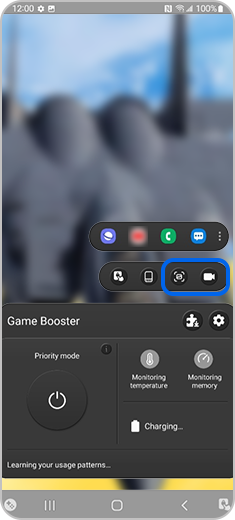
Note: Available screens and settings may vary by wireless service provider, software version, and phone model.
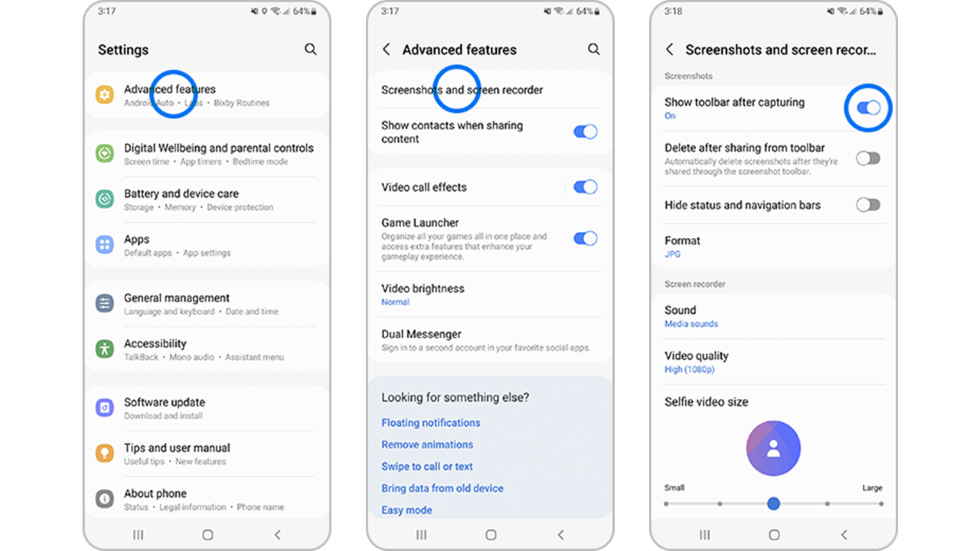
If you cannot see the recording settings in the Game Booster settings, you can change it in the device by going to:
Settings > Advanced features > Screenshots and screen recorder > Show toolbar after capturing (toggle On)
For further assistance, please contact our Chat Support. To find your Samsung product's User Manual, head to Manuals & Downloads.
Thank you for your feedback!
Please answer all questions.
Contact Info
Contact us
WhatsApp
![]()
![]()

